Frameworks Axum and Ktor
February 7, 2026
I wanted to compare two frameworks, two languages, in a real-world scenario. Simply executing one request with benchmarks doesn't reflect the full reality. I implemented two identical REST APIs on Axum and Ktor, which will allow us to test performance and usability more comprehensively. I did not set myself the goal of squeezing the maximum out of the frameworks. The priority in implementation was convenience and simplicity.
Let's compare the functionality of the two frameworks and the components available in Rust and Kotlin. Is writing in Rust really that difficult? How much does writing an application on Axum differ from Ktor? Let's count how much scary unsafe was needed in the Rust application 😉. At the end, we'll move on to the most interesting part - performance tests that can save you a lot of money on servers.
Command-line interface
Both applications have a command-line interface that allows passing data to launch the API application and have additional functionality that can be called, for example, by cron. The additional functionality of these applications is importing users into the database from a JSON file with password hashing using argon2.
Rust
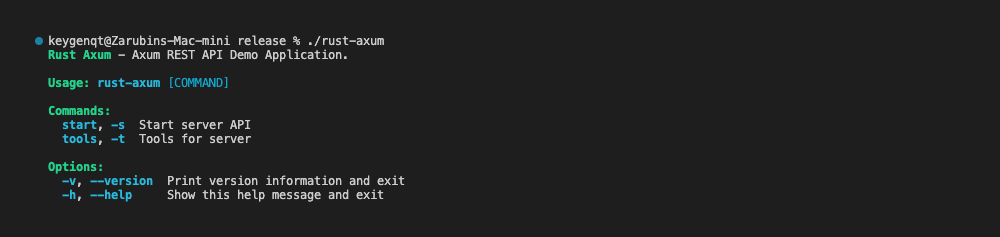
To add CLI in Rust, I use the crate - clap. It allows organizing a CLI of any complexity, is convenient, and has flexible functionality.
#[derive(Parser)]
#[command(
    disable_help_flag = true,
    disable_help_subcommand = true,
    disable_version_flag = true
)]
#[command(about=app_info::about())]
#[command(styles=app_info::styles())]
pub struct AppCLI {
    /// Print version information and exit
    #[arg(short, long, default_value_t = false)]
    pub version: bool,

    /// Commands
    #[command(subcommand)]
    pub command: Option<Commands>,

    /// Show this help message and exit
    #[arg(short, long, action = ArgAction::HelpLong)]
    pub help: Option<bool>,
}

#[derive(Subcommand)]
pub enum Commands {
    /// Start server API
    #[command(short_flag = 's')]
    Start(StartArgs),

    /// Tools for server
    #[command(short_flag = 't')]
    Tools(ToolsArgs),
}

#[tokio::main]
async fn main() {
    if AppCLI::parse().version {
        println!("Version: {}", app_info::version());
        return;
    }
    match AppCLI::parse().command {
        Some(command) => match command {
            Commands::Start(arg) => cli::start::run(arg).await,
            Commands::Tools(arg) => cli::tools::run(arg).await,
        },
        None => {
            let _ = AppCLI::command().print_help();
        }
    }
}
Kotlin
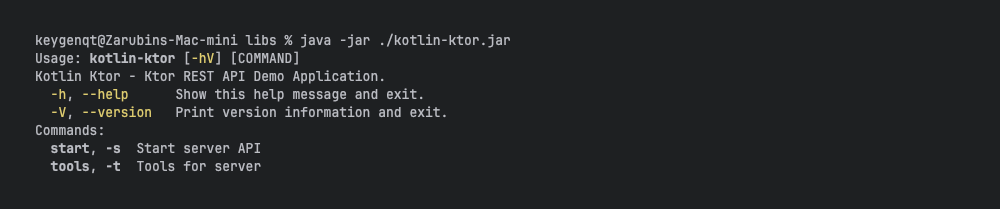
To add CLI in Kotlin, I use the Java library - picocli. The library is very popular, convenient, and has wide functionality. I tried kotlinx-cli, written in Kotlin - I wasn't satisfied with its interface, and it looks abandoned. But Kotlin can use Java libraries - which gives access to a huge selection of popular and reliable libraries. Here's what the initial group setup looks like in Kotlin:
@CommandLine.Command(
    name = AppInfo.NAME,
    version = ["Version: ${AppInfo.VERSION}"],
    description = [AppInfo.ABOUT],
    mixinStandardHelpOptions = true,
    sortOptions = false,
    subcommands = [
        StartArgs::class,
        ToolsArgs::class,
    ]
)
class AppCLI(
    private val args: Array<String>
) : Callable<Int> {
    @Spec
    lateinit var spec: CommandSpec

    override fun call(): Int {
        if (args.isEmpty()) {
            spec.commandLine().usage(System.out)
            return 0
        }
        return 0
    }
}

fun main(args: Array<String>) {
    CommandLine(AppCLI(args)).execute(*args)
}
For CLI generation in Rust, external attributes of the crate are used, in Kotlin - library annotations. Rust code is a bit more verbose, Kotlin has more "magic". But in general - they are very similar in application, and implementing a CLI of any complexity is not a problem in both languages.
Import
The tools CLI section is responsible for importing data into PostgreSQL from the users.json file. The file contains 1000 users:
[
  {
    "email": "jennifer.davis@hotmail.com",
    "fname": "Jennifer",
    "lname": "Davis",
    "password": "YmPg2VP3h2kk"
  },
  {
    "email": "m.anderson@yahoo.com",
    "fname": "Michael",
    "lname": "Anderson",
    "password": "Cnkdh9mDsDEW"
  },
...
Here passwords are stored in plain text - but passwords are not stored like this in the database; they are hashed for security. To create a password hash, I used Argon2. The task for the command is as follows:
- Get data from the file.
- Deserialize the data.
- Connect to the database.
- Get password hashes.
- Write data to the database.
I intentionally made this command run in a single thread with separate writing of each user - this is an excellent way to test the speed of the two applications. We are given a configuration file and a file with user data as input:
Rust
./rust-axum tools --config application.conf --users users.json
Kotlin
java -jar kotlin-ktor.jar tools --config application.conf --users users.json
The interface of the two applications is identical, as is the logic of the commands themselves:
Rust
pub async fn run(arg: ToolsArgs) {
    // load configuration
    let config = match get_relative_path_canonicalize(&arg.config) {
        Some(path) => {
            let contents = fs::read_to_string(path.clone())
                .expect(&format!("not read file: {}", path.to_string_lossy()));
            match hocon_rs::Config::parse_str::<AppConfig>(&contents, None) {
                Ok(result) => result,
                Err(_) => exit_error!("error read config"),
            }
        }
        None => exit_error!("not found path to config"),
    };
    if let Some(users) = arg.users {
        match get_relative_path_canonicalize(&users) {
            Some(path) => {
                // read json
                let data = fs::read_to_string(path.clone())
                    .expect(&format!("not read file: {}", path.to_string_lossy()));
                // parse json
                let mut list: Vec<UserModel> = serde_json::from_str(&data).unwrap();
                // create db instance
                let pool = configure_db(&config).await;
                // loop users
                for user in &mut list {
                    // check exist user
                    if let Ok(find) = UserService::find_by_email(
                        pool.get_owned().await.unwrap(),
                        user.email.clone(),
                    )
                    .await
                    {
                        print_error!(
		                        "{} user {}: already exists",
		                        "✗".red(),
		                        user.email.blue()
                        );
                        continue;
                    };
                    // create hash password
                    user.update_hash();
                    // insert data
                    match UserService::insert(pool.get_owned().await.unwrap(), user).await {
                        Ok(_) => {
                            print_success!("{} user {}", "✓".green(), user.email.blue(),)
                        }
                        Err(err) => {
                            print_error!(
                                "{} user {}: {}",
                                "✗".red(),
                                user.email.blue(),
                                err.message
                            )
                        }
                    }
                }
            }
            None => exit_error!("not found path to config"),
        }
        return;
    }
}
Kotlin
override fun call(): Int {
    // show help
    if (help || config == null) {
        spec.commandLine().usage(System.out)
        return 0
    }
    // check path to configuration
    if (!config.exists() || !config.isFile) {
        throw IllegalArgumentException("File configuration not found.")
    }
    // load configuration
    val config = ConfigFactory.parseString(config.readText())
    val appConfig = Hocon.decodeFromConfig<AppConfig>(config)
    // run users import
    if (users != null) {
        return importUsers(appConfig, users)
    }
    // exit success
    return 0
}

fun importUsers(config: AppConfig, pathJson: File): Int {
    if (!pathJson.exists() || !pathJson.isFile) {
        throw IllegalArgumentException("File JSON for import users not found.")
    }
    // init db logger level
    (LoggerFactory.getLogger(ROOT_LOGGER_NAME) as Logger).apply {
        level = Level.OFF
    }
    // init database
    val database = configureDatabase(config)
    // init user service db
    val userService = UserService(database)
    // read json, parse
    val usersJson: List<UserModel> = Json.decodeFromString(pathJson.readText())
    // loop users
    usersJson.forEach { model ->
        // check exist user
        val find = runBlocking { userService.findByEmail(email = model.email) }
        if (find != null) {
            println("""✗ user ${find.email}: already exists""")
            return@forEach
        }
        // create hash password
        val user = model.updateHash()
        // insert data
        try {
            runBlocking {
                userService.insert(
                    email = user.email,
                    fname = user.fname,
                    lname = user.lname,
                    pwdHash = user.pwdHash!!,
                )
                println("""✓ user ${user.email}""")
            }
        } catch (e: Exception) {
            println(
                """✗ user ${user.email}: ${
                    e.message?.split("\n")
                        ?.lastOrNull()
                        ?.trim()
                        ?.split("  ")
                        ?.firstOrNull()
                }"""
            )
        }
    }
    return 0
}
For password hashing, the crate argon2 and the library spring-security-crypto are used.
Rust
pub fn update_hash(&mut self) {
    let password = self.password.clone().expect("password expected");
    let salt = SaltString::generate(&mut OsRng);
    let params = Params::new(
        constants::ARGON2_DEFAULT_M_COST, // default for spring Argon2
        Params::DEFAULT_T_COST,
        Params::DEFAULT_P_COST,
        None,
    )
    .unwrap();
    let argon2 = Argon2::from(params);
    let hash = argon2
        .hash_password(password.as_bytes(), &salt)
        .expect("error create hash")
        .to_string();
    self.pwd_hash = Some(hash);
}
Kotlin
fun updateHash(): UserModel {
    if (password != null) {
        val encoder = Argon2PasswordEncoder.defaultsForSpringSecurity_v5_8()
        val hash = encoder.encode(password)
        return this.copy(pwdHash = hash)
    }
    throw RuntimeException("Password expected")
}
By default, the password hashing parameters in Rust and Kotlin are different. In Rust, I configured argon2 to match the parameters of argon2 from Kotlin (or rather Java, but that's a nuance). This allows us to run fair tests.
CLI Tests
Organizing CLI tests is simple - run and get the execution time. I made 3 tests each for the command <app> tools --config application.conf --users users.json.
Important! Don't even try testing the
debugversion of Rust - it's slow, you need to build the release version of the application.
| Rust | Kotlin |
|---|---|
| 8.56s | 17.93s |
| 8.51s | 17.84s |
| 8.53s | 17.81s |
The test covers many tasks performed by the application: from reading a file to writing data to the database. The builds use cargo and the Gradle command provided by Ktor - buildFatJar. The result you see: Rust is already more than 2 times faster in CLI. What does this mean? The server will require fewer resources to perform the same work. But this is Rust vs Kotlin. The Axum vs Ktor results are even more interesting.
Home page
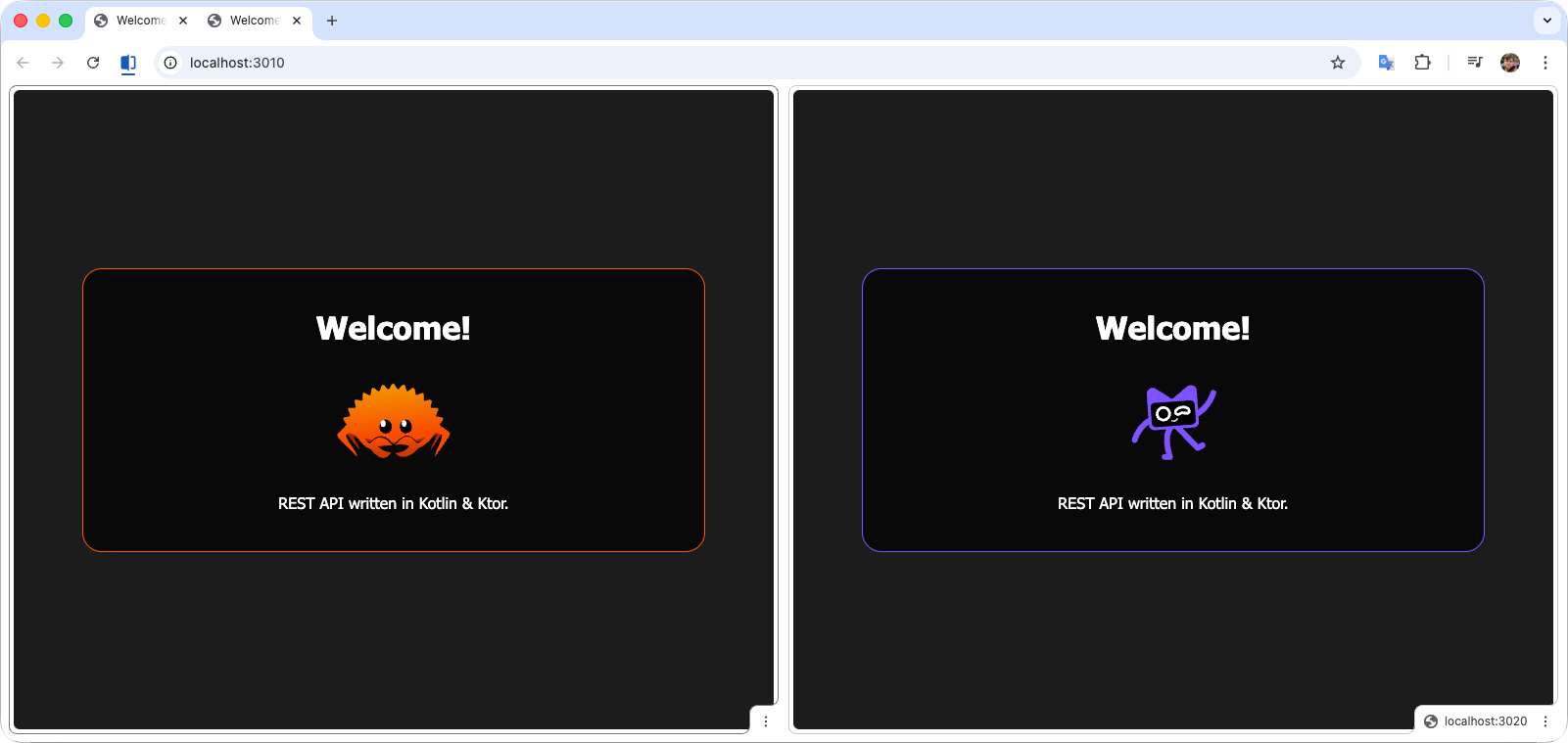
An API can have a main page; it's a normal web application after all. I add a main page to my APIs, I think it's important so that a person navigating to the API URL knows where they ended up and can verify that the API is working. Documentation can also be located on the main page - convenient when everything is together.
HTML
A main page is implemented in the projects: in Axum, HTML is formed as a simple string; in Ktor, I used the library kotlinx.html. In both projects, the HTML is directly in the code; you could use static files if desired, but that is significantly slower under load.
Rust
pub async fn index() -> Result<Html<&'static str>, AppResponse> {
Ok(Html(
r#"<!DOCTYPE html>
<html>
<head>
<title>Welcome!</title>
<style>/** style... */</style>
</head>
<body>
<table class="Root-Table">
<tr class="Root-Tr">
<td class="Root-Td">
<div class="Box">
<h1>Welcome!</h1>
<div class="Icon">
<img alt="Ferris" src="https://raw.gitcode.com/ferris.svg"/>
</div>
<div>REST API written in Kotlin & Ktor.</div>
</div>
</td>
</tr>
</table>
</body>
</html>"#,
))
}
Kotlin
fun Route.home() {
    get("/") {
        call.respondHtml {
            head {
                title { +"Welcome!" }
                style {
                    unsafe {
                        +"""
                            /** style... */
                        """.trimIndent()
                    }
                }
            }
            body {
                table(classes = "Root-Table") {
                    tr(classes = "Root-Tr") {
                        td(classes = "Root-Td") {
                            div(classes = "Box") {
                                h1 {
                                    +"Welcome!"
                                }
                                div(classes = "Icon") {
                                    img(
                                        src = "https://raw.gitcode.com/kodee.svg",
                                        alt = "Kodee"
                                    )
                                }
                                div {
                                    +"REST API written in Kotlin & Ktor."
                                }
                            }
                        }
                    }
                }
            }
        }
    }
}
Kotlin has an excellent thing - DSL, which allows creating concise, readable, and type-safe "mini-languages". An example of such a language is writing HTML in Kotlin. Rust cannot boast of such.
Routing
Let's look at the code that creates routing in Axum and Ktor. We created a main page, which we reach by navigating to the route /. We also have API routes - it's better to separate them: /api/<url>, if in the future we want to add documentation, it can be located, for example, at /docs/<url>.
In both applications, we have the same routing:
/- main page (home page)./api/auth- user authentication./api/logout- user session deletion./api/users- get list of users./api/users/{id}- get user by ID.
The API is available to both guests and authorized users. The session needs to be validated and checked against the database - in case the user is already deleted or blocked.
Rust
pub async fn configure_route() -> Router {
	Router::new()
	    .route("/", get(guest::home::index))
	    .route("/api/auth", post(guest::auth::basic))
	    .route("/api/logout", delete(guest::auth::logout))
	    .route("/api/users", get(user::users::search))
	    .route("/api/users/{id}", get(user::users::get_by_id))
}
Kotlin
fun Application.configureServer() {
    routing {
        home()
        route("/api") {
            authBasic()
            authLogout()
            authenticate(Constants.SESSION_NAME) {
                usersSearch()
                usersFindById()
            }
        }
    }
}
Right now we are interested in the main page, mentioned above. We need to return the HTML that the browser will display. To do this, we simply pass to the framework the functions that need to be called when a specific route is requested.
In both languages, routing is concise and simple. But note that Rust returns a value that must be returned, whereas Ktor has some "magic". On one hand, "magic" simplifies the code, but complicates reading the code without prior preparation. What's better: less code or more "magic" is up to you.
Configuration
The configuration file is an important part of the application. In Ktor, such a file is by default in the resources and changing it requires recompilation of the application, which is not very convenient. It's best to move such a file out of the application and pass it as a CLI parameter.
For both projects, I used the type of configuration file that comes by default in Ktor - HOCON. You can leave comments in it and conveniently pass all the necessary parameters to the application, unlike, for example, JSON.
For HOCON deserialization in Kotlin, we can use the library com.typesafe:config, and in Rust we can use the crate hocon-rs.
Rust
use serde::Deserialize;

#[derive(Deserialize, Clone)]
pub struct AppConfig {
    pub server: ServerConfig,
    pub deployment: DeploymentConfig,
    pub postgres: PostgresConfig,
}

//...

let contents = fs::read_to_string(path).unwrap();
let config: AppConfig = match hocon_rs::Config::parse_str(&contents, None) {
    Ok(result) => result,
    Err(_) => exit_error!("error read config"),
};
Kotlin
@Serializable
data class AppConfig(
    val server: ServerConfig,
    val deployment: DeploymentConfig,
    val postgres: PostgresConfig
)

//...

val config = ConfigFactory.parseString(config.readText())
val appConfig = Hocon.decodeFromConfig<AppConfig>(config)
In general, nothing complicated in either Rust or Kotlin. We deserialize the data in one line and get a (nested) model for the application that we can use where needed.
Database
In the applications, I used the PostgreSQL database. For applications with a database, important factors are the presence of migrations and an ORM. There are lovers of pure queries, but I'm not one of them - ORM simplifies code writing and adds safety. At the very least, SQL injections are not a threat.
In Rust, to solve these tasks we have the following set of crates:
- Diesel - a safe, extensible ORM and query builder.
- Diesel - database migrations.
- Diesel - works great with Axum.
In Kotlin, to solve these tasks we have the following set of libraries:
- Exposed - a type-safe domain-specific library for working with SQL.
- Flyway - easily and reliably changes your database schema.
- Exposed - works great with Ktor.
Flyway is a good library for migrations - one downside: rollback is paid, unlike Diesel.
Actually, the list is longer - you can get acquainted with the dependencies in detail in the project repository. I listed the main libraries for our tasks. Under the hood, there are other important ones, but that's not the point - we work with the libraries I mentioned above.
Connection
To connect to the database, we need to pass the connection string to Exposed and Diesel. They are slightly different, but the essence is the same.
Rust
postgres {
  url = "postgres://localhost:5432/my_dbname"
  user = username
  password = 00000000
}
pub const MIGRATIONS: EmbeddedMigrations = embed_migrations!("migrations/");

pub async fn configure_db(config: &AppConfig) -> bb8::Pool<AsyncPgConnection> {
    // create connect url
    let url = config.postgres.url.replace(
        "postgres://",
        &format!(
            "postgres://{}:{}@",
            config.postgres.user, config.postgres.password
        ),
    );
    // set up connection pool
    let config = AsyncDieselConnectionManager::<diesel_async::AsyncPgConnection>::new(url);
    let pool = bb8::Pool::builder().build(config).await.unwrap();
    // migration
    let mut harness = AsyncMigrationHarness::new(pool.get_owned().await.unwrap());
    harness.run_pending_migrations(MIGRATIONS).unwrap();
    // result
    pool
}
Here we modify the query string by adding the user and password from the configuration file. We connect to the database and run migrations.
Kotlin
postgres {
  url = "jdbc:postgresql://localhost:5432/my_dbname"
  user = username
  password = 00000000
}
fun configureDatabase(
    config: AppConfig
): Database {
    // connect to db
    val database = connect(
        url = config.postgres.url,
        user = config.postgres.user,
        password = config.postgres.password,
    )
    // location migrations
    val cwd = Paths.get("").toAbsolutePath()
    val locations = mutableListOf("filesystem:${cwd}/migrations").apply {
        if (config.server.development) {
            add("filesystem:${cwd}/../../migrations")
        }
    }
    // migration
    val flyway = Flyway.configure()
        .baselineOnMigrate(true)
        .sqlMigrationPrefix("")
        .sqlMigrationSeparator("_")
        .locations(*locations.toTypedArray())
        .dataSource(config.postgres.url, config.postgres.user, config.postgres.password)
        .load()
    flyway.info()
    flyway.migrate()
    // result
    return database
}
Here we create a connection, configure Flyway, and specify where to look for migrations.
ORM
Let's compare the ORM Diesel and Exposed to understand if there is a benefit in using Kotlin, which (so far only in CLI) is 2 times slower.
Rust
// Table users
diesel::table! {
    users_axum (id) {
        id -> Integer,
        email -> VarChar,
        fname -> VarChar,
        lname -> VarChar,
        pwd_hash -> Nullable<VarChar>,
        create_at -> Timestamp,
    }
}

/// Entity
#[serde_as]
#[derive(Serialize, HasQuery)]
#[diesel(table_name = users_axum)]
pub struct UserEntity {
    pub id: i32,
    pub email: String,
    pub fname: String,
    pub lname: String,
    pub pwd_hash: Option<String>,
    #[serde_as(as = "TimestampMilliSeconds<i64>")]
    pub create_at: NaiveDateTime,
}
Kotlin
/**
 * Table users
 */
object User : IntIdTable("users_ktor") {
    val email = varchar("email", length = 255).uniqueIndex()
    val fname = varchar("fname", length = 255)
    val lname = varchar("lname", length = 255)
    val pwdHash = varchar("pwd_hash", length = 255)
    val createAt = timestamp("create_at").defaultExpression(CurrentTimestamp)
}

/**
 * Entity
 */
class UserEntity(id: EntityID<Int>) : IntEntity(id) {
    companion object : IntEntityClass<UserEntity>(User)

    var email by User.email
    var fname by User.fname
    var lname by User.lname
    var pwdHash by User.pwdHash
    var createAt by User.createAt
}
Well, the difference isn't significant. Let's compare a query maybe. Why do they say Rust is so difficult?
Rust
/// Search user by fname and lname
pub async fn search(
    mut conn: PooledConnection<'static, AsyncPgConnection>,
    fname: Option<String>,
    lname: Option<String>,
) -> Result<Vec<UserModel>, AppResponse> {
    if fname.is_none() && lname.is_none() {
        return Ok(vec![]);
    }
    let result: Vec<UserModel> = UserEntity::query()
        .filter(dsl::fname.ilike(format!("%{}%", fname.unwrap_or("".to_string()))))
        .filter(dsl::lname.ilike(format!("%{}%", lname.unwrap_or("".to_string()))))
        .load(&mut conn)
        .await
        .map_err(db_handle_error)?
        .iter()
        .map(|e| UserModel::from_entity(e))
        .collect();
    Ok(result)
}
Kotlin
/**
 * Search user by fname and lname
 */
suspend fun search(
    fname: String?,
    lname: String?,
): List<UserModel> = database.transaction {
    User
        .selectAll()
        .apply {
            if (fname != null) {
                orWhere { (User.fname ilike "%${fname}%") }
            }
            if (fname != null) {
                orWhere { (User.lname ilike "%${lname}%") }
            }
        }
        .map { UserEntity.wrapRow(it) }
        .map { it.toModel() }
}
Yes, Rust looks more complicated. Only there's a problem, Exposed doesn't have ilike, it needs to be added manually.
/**
 * Define a custom Op class for ILIKE
 */
class InsensitiveLikeOp(expr1: Expression<*>, expr2: Expression<*>) : ComparisonOp(expr1, expr2, "ILIKE")

/**
 * Create an infix extension function for convenience
 */
infix fun <T : String?> ExpressionWithColumnType<T>.ilike(pattern: T): Op<Boolean> =
    InsensitiveLikeOp(this, QueryParameter(pattern, columnType))
It's not all obvious here, let's move on. Whoever seeks shall find the complexity of Rust.
Serialization
Data serialization in Kotlin is ideal - you connect the serialization plugin, add the @Serializable annotation, and that's it. It's convenient. How are things in Rust?
Rust
/// Model user entry [UserEntity]
#[serde_as]
#[derive(Serialize, Deserialize)]
pub struct UserModel {
    pub id: Option<i32>,
    pub email: String,
    pub fname: String,
    pub lname: String,
    #[serde(skip_serializing)]
    pub pwd_hash: Option<String>,
    #[serde(skip_serializing)]
    pub password: Option<String>,
    #[serde(default = "utils::local_time::chrono_time_now")]
    #[serde_as(as = "TimestampMilliSeconds<i64>")]
    pub create_at: NaiveDateTime,
}
Kotlin
/**
 * Model user entry [UserEntity]
 */
@Serializable
data class UserModel(
    val id: Int? = null,
    val email: String,
    val fname: String,
    val lname: String,
    val pwdHash: String? = null,
    val password: String? = null,
    @SerialName("create_at")
    val createAt: Long = System.currentTimeMillis(),
)
In Rust, there is an excellent crate - serde, there's nothing it can't do, and it's also simple. Serialization in Rust is no more difficult than in Kotlin. And often, if you have an exotic format, serde will be significantly easier to extend than serialization.
Authorization
In the applications for performance testing, I added Basic Auth. Authorization allows engaging most of the API application:
- Routing.
- Hashing.
- Database.
- Sessions.
This is one of the test cases. Good overall system load. And here lies a nuance of routing - data transfer. To pass database connections, configuration, get incoming request parameters - frameworks help.
Dependency Injection
In Kotlin, Dependency Injection (DI) is used - in my application, it's Koin. We configure the project and add the necessary components to DI, which can be obtained in routing.
Rust does not use such approaches. Axum allows passing data through states and configuring them. Essentially, you simply receive the specified parameters in the function.
Let's compare Axum's State and Koin.
Axum State
Create a data structure:
#[derive(Clone, FromRef)]
pub struct AppState {
    pub jkey: Arc<Key>,
    pub conf: Arc<AppConfig>,
    pub auth: Arc<Option<UserAuth>>,
    pub pool: Arc<bb8::Pool<AsyncPgConnection>>,
}
Initialize it and pass it to routing:
pub async fn configure_route(config: &AppConfig) -> Router {
    let state = AppState {
        jkey: Arc::new(Key::from(config.server.secret.as_bytes())),
        conf: Arc::new(config.clone()),
        auth: Arc::new(None),
        pool: Arc::new(configure_db(config).await),
    };
    Router::new()
        .route("/", get(guest::home::index))
        .route("/api/auth", post(guest::auth::basic))
        .route("/api/logout", delete(guest::auth::logout))
        .route("/api/users", get(user::users::search))
        .route("/api/users/{id}", get(user::users::get_by_id))
        .with_state(state)
}
For additional data processing, we can implement the structure as FromRequestParts:
/// Impl for route AsyncPgConnection
pub struct Db(pub bb8::PooledConnection<'static, AsyncPgConnection>);

impl FromRequestParts<AppState> for Db {
    type Rejection = AppResponse;

    async fn from_request_parts(
        _parts: &mut Parts,
        state: &AppState,
    ) -> Result<Self, Self::Rejection> {
        let state = AppState::from_ref(state);
        let conn = state
            .pool
            .get_owned()
            .await
            .map_err(db_handle_internal_error)?;
        Ok(Db(conn))
    }
}
After that, we can receive data in the function specified in routing:
/// POST basic auth cookie
/// /api/auth
pub async fn basic(
    jar: PrivateCookieJar,
    Db(conn): Db, // Get state Db
    AuthBasic((id, password)): AuthBasic,
) -> Result<(PrivateCookieJar, AppResponse), AppResponse> {
    // find user
    let result = UserService::find_by_email(conn, id).await?;
    // check exist pass
    if password.is_none() {
        return Err(AppResponse::new_403());
    }
    // argon2 validate pass
    if !result.password_valid(&password.unwrap()) {
        return Err(AppResponse::new_403());
    }
    // get value string
    let model_json = serde_json::to_string(&UserAuth {
        id: result.id.unwrap(),
        email: result.email,
    })
    .unwrap();
    // create cookie session
    let mut token_hash = Cookie::new(constants::SESSION_NAME, model_json);
    token_hash.set_http_only(true);
    token_hash.set_path("/");
    token_hash.set_expires(local_time::cookie_time_expires());
    // result
    Ok((jar.add(token_hash), AppResponse::new_200()))
}
Following the same scheme, we can pass everything necessary, and other crates can extend the amount of all kinds of data - here we see the work of the crate axum-auth - AuthBasic comes from it. PrivateCookieJar - from the Axum extension axum-extra.
Koin
In Kotlin, the typical approach is using DI. It has many different settings; in this case, we are interested in a simple Singleton. To initialize the database and model services, we register them in Koin:
// init database
val database = configureDatabase(config)
// init DI Koin
install(Koin) {
    printLogger(if (config.server.development) KoinLevel.DEBUG else KoinLevel.NONE)
    modules(
        module {
            single { config }
            single { UserService(database) }
        }
    )
}
After registration, we can get it in routing like this:
/**
 * POST basic auth cookie
 */
fun Route.authBasic() {
    // Get singleton user service
    val dataService: UserService by inject()
    route("/auth") {
        post {
            val credentials = call.request.basicAuthenticationCredentials()
                ?: throw Exceptions.Forbidden()
            // find user
            val result = dataService.findByEmail(credentials.name)
                ?: throw Exceptions.NotFound()
            // argon2 validate pass
            if (!result.passwordValidate(credentials.password)) {
                throw Exceptions.Forbidden()
            }
            // get auth model
            val userAuth = UserAuth(
                id = result.id!!,
                email = result.email,
            )
            // clear session if exist
            call.sessions.clear<UserAuth>()
            // set new session
            call.sessions.set(userAuth)
            // result
            call.respond(
                StatusResponse(
                    code = HttpStatusCode.OK.value,
                    message = HttpStatusCode.OK.description
                )
            )
        }
    }
}
Here, Ktor does most of the work - it gets the Basic Auth data, saves the session in a cookie. From Koin we simply get UserService, with which we can make a database query. UserAuth is just a data class with the @Serializable annotation.
Rust gives more control and isn't that complicated. Ktor is simple, but has more "magic".
Authentication
For session validation, Axum and Ktor offer different approaches. If in Axum everything is simple, very little different from what was described above, then Ktor again offers magical rituals. Let's compare how we can check a user in different frameworks.
Rust
Just like when getting the database, we can get all the necessary states. To do this, we implement FromRequestParts, check the user data, and pass the result to the routing function:
/// Impl for route UserModel
pub struct AuthModel(pub Arc<Option<UserAuth>>);

impl FromRequestParts<AppState> for AuthModel {
    type Rejection = AppResponse;

    async fn from_request_parts(
        parts: &mut Parts,
        state: &AppState,
    ) -> Result<Self, Self::Rejection> {
        let mut state = AppState::from_ref(state);
        // get secret cookies
        let key = (*state.jkey).clone();
        let jar = match PrivateCookieJar::<Key>::from_request_parts(parts, &key).await {
            Ok(jar) => jar,
            Err(err) => match err {},
        };
        // get auth model
        let user_auth = if let Some(data) = jar.get(constants::SESSION_NAME) {
            match serde_json::from_str::<UserAuth>(data.value()) {
                Ok(model) => Some(model),
                Err(_) => None,
            }
        } else {
            None
        };
        // database check
        if let Some(user_auth) = user_auth.clone() {
            // get connect
            let conn = state
                .pool
                .get_owned()
                .await
                .map_err(db_handle_internal_error)?;
            // get or error
            let _ = UserService::find_by_id(conn, user_auth.id).await?;
        };
        // save
        state.auth = Arc::new(user_auth);
        // result
        Ok(AuthModel(state.auth))
    }
}
In the function, this state can be obtained like this:
/// GET find by user ID
/// /api/users/{id}
pub async fn get_by_id(
    AuthModel(user): AuthModel,
    Db(conn): Db,
    Path(id): Path<i32>,
) -> Result<AppJson<UserModel>, AppResponse> {
    if user.is_some() {
        let result = UserService::find_by_id(conn, id).await?;
        Ok(AppJson(result))
    } else {
        Err(AppResponse::new_403())
    }
}
Everything is simple - got the data, checked it.
Kotlin
To check a user session in Ktor, you need to use the plugins io.ktor.server.sessions and io.ktor.server.auth. They need to be registered:
// init session
install(Sessions) {
    cookie<UserAuth>(Constants.SESSION_NAME) {
        cookie.path = "/"
        cookie.httpOnly = true
        cookie.maxAgeInSeconds = 43200 // 12 hours
        transform(
            SessionTransportTransformerEncrypt(
                config.server.secret.take(16).toByteArray(),
                config.server.secret.take(16).toByteArray()
            )
        )
    }
}

// init auth
install(Authentication) {
    val userService: UserService by inject(UserService::class.java)
    session<UserAuth>(Constants.SESSION_NAME) {
        validate { session ->
            if(userService.findById(session.id) != null) {
                session
            } else {
                null
            }
        }
        challenge {
            throw Exceptions.Forbidden()
        }
    }
}
Routing will automatically validate the session and prevent unauthorized users from accessing the usersSearch and usersFindById functions:
routing {
    home()
    route("/api") {
        authBasic()
        authLogout()
        authenticate(Constants.SESSION_NAME) {
            usersSearch()
            usersFindById()
        }
    }
}
Response
An API can return responses in different formats; JSON is the simplest and most commonly used output format. The response format is easily configurable in both Axum and Ktor. Sometimes clients make incorrect requests, and the API should return an error in the required format - any request to the API must be processed.
Rust
Axum has a built-in component that allows returning response data in JSON.
#[derive(Serialize)]
struct ApiResponse {
    message: String,
    status: String,
}

async fn get_status() -> (StatusCode, Json<ApiResponse>) {
    let response_data = ApiResponse {
        message: "System is operational".to_string(),
        status: "OK".to_string(),
    };
    (StatusCode::OK, Json(response_data))
}
For additional response processing, we can implement IntoResponse. This will allow controlling the response from the entire application. Even if such control is not needed at an early stage, I would recommend adding it right away so that it doesn't become painfully difficult later.
#[derive(Serialize)]
struct ApiResponse {
    message: String,
    status: String,
}

#[derive(FromRequest)]
#[from_request(via(Json), rejection(AppResponse))]
pub struct AppJson<T>(pub T);

impl<T> IntoResponse for AppJson<T>
where
    Json<T>: IntoResponse,
{
    fn into_response(self) -> Response {
        Json(self.0).into_response()
    }
}

async fn get_status() -> (StatusCode, AppJson<ApiResponse>) {
    let response_data = ApiResponse {
        message: "System is operational".to_string(),
        status: "OK".to_string(),
    };
    (StatusCode::OK, AppJson(response_data))
}
To intercept server errors and requests for invalid routes, we need to return a response. For this, we can create a response variant with additional processing if necessary.
#[derive(Debug, Clone)]
pub struct AppResponse {
    pub code: StatusCode,
    pub message: String,
}

impl AppResponse {
    pub fn new(code: StatusCode, message: String) -> Self {
        Self { code, message }
    }

    pub fn new_403() -> Self {
        Self {
            code: StatusCode::FORBIDDEN,
            message: "Access denied".to_string(),
        }
    }

    pub fn new_404() -> Self {
        Self {
            code: StatusCode::NOT_FOUND,
            message: "Not Found".to_string(),
        }
    }
}

impl IntoResponse for AppResponse {
    fn into_response(self) -> Response {
        // response data
        #[derive(Serialize)]
        struct ErrorResponse {
            code: u16,
            message: String,
        }
        // copy app response
        let app_response = self.clone();
        // create response
        let mut response = (
            self.code,
            AppJson(ErrorResponse {
                code: self.code.as_u16(),
                message: self.message,
            }),
        ).into_response();
        // set error to response
        response.extensions_mut().insert(Arc::new(app_response));
        // result
        response
    }
}
This will allow controlling the application's responses. For example, we can return 403 in an API method if the user is not authorized or their access rights are insufficient.
/// GET find by user ID
/// /api/users/{id}
pub async fn get_by_id(
    AuthModel(user): AuthModel,
    Db(conn): Db,
    Path(id): Path<i32>,
) -> Result<AppJson<UserModel>, AppResponse> {
    if user.is_some() {
        let result = UserService::find_by_id(conn, id).await?;
        Ok(AppJson(result))
    } else {
        Err(AppResponse::new_403())
    }
}
To handle an invalid route in Axum, you need to add an API function for this case.
Router::new()
    .route("/", get(guest::home::index))
    //...
    .fallback(handle_404)

/// Handle route 404
async fn handle_404() -> impl IntoResponse {
    AppResponse::new_404()
}
To intercept all application errors and handle them, we can add another function. In it, we can get the error by type and perform the necessary actions.
Router::new()
    .route("/", get(guest::home::index))
    //...
    .layer(from_fn(log_app_errors))

/// Handle any error for tracing
async fn log_app_errors(request: Request, next: Next) -> Response {
    let response = next.run(request).await;
    if let Some(err) = response.extensions().get::<Arc<AppResponse>>() {
        tracing::error!(?err, "an unexpected error occurred inside a handler");
    }
    response
}
Kotlin
To configure the output result in Ktor, you need to activate and configure the ContentNegotiation plugin.
install(ContentNegotiation) {
    json(
        Json {
            isLenient = true
            ignoreUnknownKeys = true
            coerceInputValues = true
        }
    )
}
After configuration, we can use a data class with the @Serializable annotation for the response.
@Serializable
data class StatusResponse(val code: Int, val message: String)

fun Route.authLogout() {
    route("/logout") {
        delete {
            // clear session if exist
            call.sessions.clear<UserAuth>()
            // result
            call.respond(
                StatusResponse(
                    code = HttpStatusCode.OK.value,
                    message = HttpStatusCode.OK.description
                )
            )
        }
    }
}
To intercept and handle errors, we must register the StatusPages plugin.
install(StatusPages) {
    status(HttpStatusCode.Unauthorized, HttpStatusCode.NotFound) { call, cause ->
        call.respond(
            status = cause,
            message = StatusResponse(
                code = cause.value,
                message = cause.description
            )
        )
    }
    exception<Throwable> { call, cause ->
        call.respond(
            status = HttpStatusCode.InternalServerError,
            message = StatusResponse(
                code = HttpStatusCode.InternalServerError.value,
                message = cause.message ?: HttpStatusCode.InternalServerError.description
            )
        )
    }
}
All exceptions and routing errors will go here for additional processing. For convenience and greater control over errors, we can add our own exception class and intercept it, similar to what was done above in Axum.
sealed class Exceptions(
    open val status: HttpStatusCode,
) : RuntimeException() {
    data class NotFound(
        override val status: HttpStatusCode = HttpStatusCode.NotFound
    ) : Exceptions(status)

    data class Forbidden(
        override val status: HttpStatusCode = HttpStatusCode.Forbidden
    ) : Exceptions(status)
}

install(StatusPages) {
    status(HttpStatusCode.Unauthorized, HttpStatusCode.NotFound) { call, cause ->
        call.respond(
            status = cause,
            message = StatusResponse(
                code = cause.value,
                message = cause.description
            )
        )
    }
    exception<Throwable> { call, cause ->
        if (cause is Exceptions) {
            call.respond(
                status = cause.status,
                message = StatusResponse(
                    code = cause.status.value,
                    message = cause.status.description
                )
            )
        } else {
            call.respond(
                status = HttpStatusCode.InternalServerError,
                message = StatusResponse(
                    code = HttpStatusCode.InternalServerError.value,
                    message = cause.message ?: HttpStatusCode.InternalServerError.description
                )
            )
        }
    }
}
Now in the route function we can throw an exception with the Exceptions class and be sure that the API user will receive the response we set.
/**
 * GET find by user ID
 */
fun Route.usersFindById() {
    val dataService: UserService by inject()
    route("/users/{id}") {
        get {
            val id = call.parameters["id"]?.toIntOrNull() ?: throw Exceptions.NotFound()
            // act
            val response = dataService.findById(id) ?: throw Exceptions.NotFound()
            // response
            call.respond(response)
        }
    }
}
In terms of response handling, Axum and Ktor are slightly different, but the logic is the same: controlling responses is easily achieved in both Rust and Kotlin.
Docker Compose
And now we have two applications, with CLI and API, external configuration in HOCON, connection to PostgreSQL database and ORM, authorization and authentication, data serialization and error handling, full control of responses and tracing. We're missing containerization.
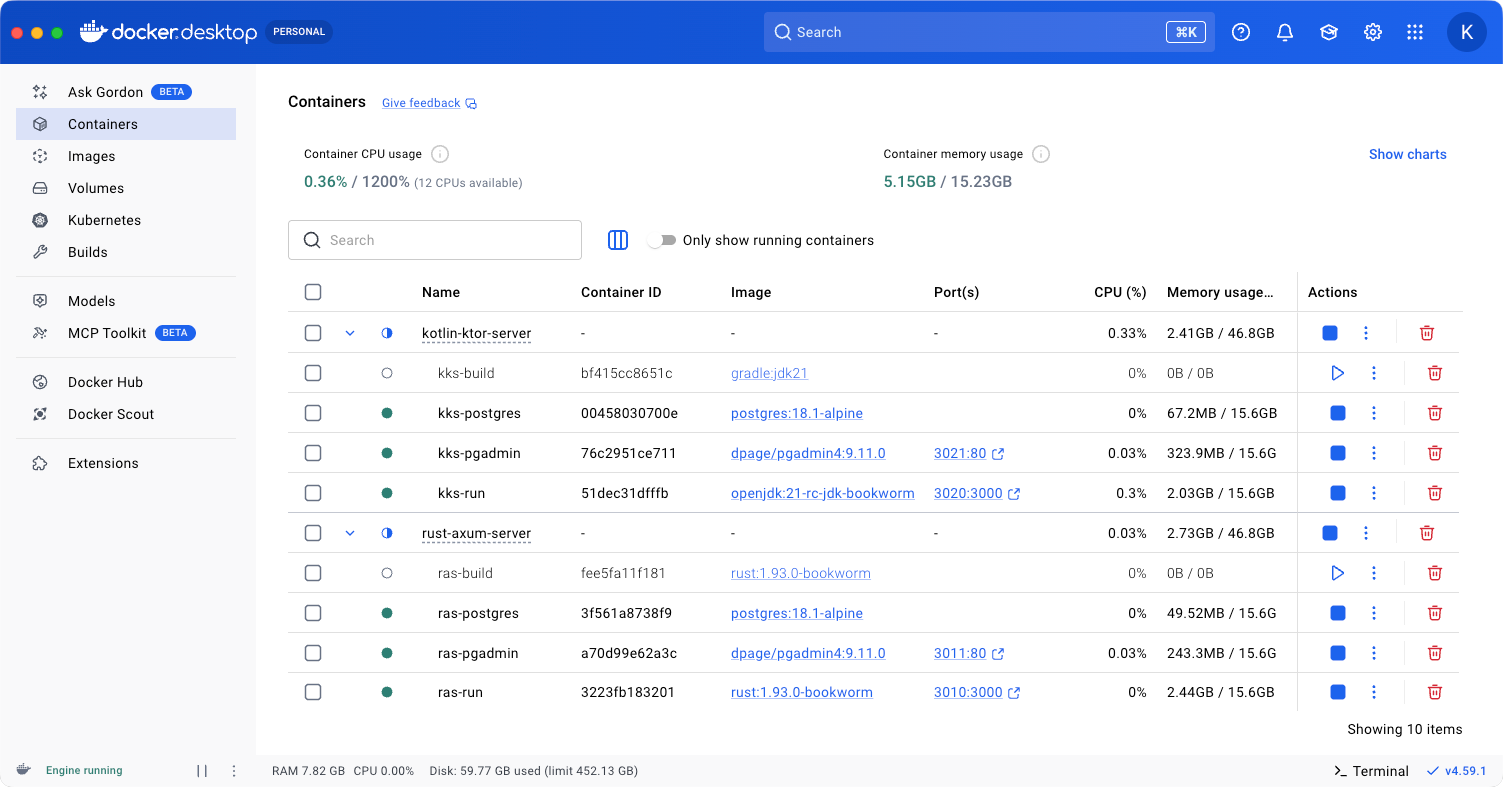
The server where our application should run needs to be configured: install the database, Rust or JDK to build the project, it would be nice to have the ability to administer the database. All this can be packaged into Docker Compose, configure the build and launch of all services with one command:
docker compose up -d
To manage Compose parameters, you can use the .env file. With it, you can pass the necessary data to the configuration file - compose.yml. When starting the build, Compose will make all variables specified in .env available in compose.yml.
<project>/docker/.env
# Run
API_PORT=3010
# Secret key must be at least 64 bytes long
API_SECRET=JyC08DLChGWHv16pt8V8rVbGxQ7RdoHUpsIjnyAwqWf0IjAvZCRpl7TpqN4LdrYd

# Db
POSTGRES_DB=postgres
POSTGRES_USER=postgres
POSTGRES_PASSWORD=postgres

# Db manager
PGADMIN_PORT=3011
PGADMIN_EMAIL=my@email.com
PGADMIN_PASSWORD=postgres
Build
The build for Rust and Kotlin applications differs, which is obvious. But the setup and configuration files are identical with minor exceptions - Exposed and Diesel have different PostgreSQL connection parameters.
Note the project paths. In the examples, I provide the Rust configuration option; for Kotlin, the build result paths will differ: for Rust it's
<project>/target/release, for Kotlin it's<project>/build/libs.
services:
  # Build
  build:
    container_name: ras-build
    image: rust:1.93.0-bookworm # gradle:jdk21 - for Kotlin
    command:
      - /bin/bash
      - -c
      - |
        ################################
        ## Build project rust-axum
        ################################
        cargo build --release # ./gradlew buildFatJar - for Kotlin

        ################################
        ## Create app config from .env
        ################################
        cat > target/release/application.conf <<EOF
        server {
          development = false
          secret = ${API_SECRET}
        }
        deployment {
          host = 0.0.0.0
          port = 3000
        }
        postgres {
	        # "jdbc:postgresql://postgres:5432/${POSTGRES_DB}" - for Kotlin
          url = "postgres://postgres:5432/${POSTGRES_DB}"
          user = "${POSTGRES_USER}"
          password = "${POSTGRES_PASSWORD}"
        }
        EOF

        ################################
        ## Create connect config pgadmin
        ################################
        cat > target/release/pgadmin_servers.json <<EOF
        {
          "Servers": {
            "1": {
              "Name": "My Local PostgresSQL Database",
              "Group": "Servers",
              "Host": "postgres",
              "Port": 5432,
              "MaintenanceDB": "${POSTGRES_DB}",
              "Username": "${POSTGRES_USER}",
              "SSLMode": "prefer",
              "Comment": "Automatically connected server via Docker Compose."
            }
          }
        }
        EOF
    working_dir: /var/www
    volumes:
      - ../:/var/www
In this container, the project is built and configuration files are formed based on data obtained from .env for subsequent application launch.
Postgres
Database settings for the applications are identical. An important point - before launching the application, you need to wait for the container not just to start, but for PostgreSQL to be ready for work. Such a check can be added using healthcheck.
services:
  postgres:
    container_name: ras-postgres
    image: postgres:18.1-alpine
    depends_on:
      build:
        condition: service_completed_successfully
    restart: always
    environment:
      POSTGRES_DB: ${POSTGRES_DB}
      POSTGRES_USER: ${POSTGRES_USER}
      POSTGRES_PASSWORD: ${POSTGRES_PASSWORD}
    healthcheck:
      test: ["CMD-SHELL", "pg_isready"]
      interval: 10s
      timeout: 5s
      retries: 5
    networks:
      - internal
pgAdmin
With the pgAdmin container, you can access the database for administration. Using the web interface, you can access the database from anywhere.
services:
  pgadmin:
    container_name: ras-pgadmin
    image: dpage/pgadmin4:9.11.0
    depends_on:
      postgres:
        condition: service_healthy
      build:
        condition: service_completed_successfully
    restart: always
    ports:
      - ${PGADMIN_PORT}:80
    environment:
      PGADMIN_DEFAULT_EMAIL: ${PGADMIN_EMAIL}
      PGADMIN_DEFAULT_PASSWORD: ${PGADMIN_PASSWORD}
    volumes:
      - ../target/release/pgadmin_servers.json:/pgadmin4/servers.json
    networks:
      - internal
Run
The application launches in a separate container when all other containers have already completed their work or have been successfully launched. In the build, the containers for running Rust and Kotlin will be different, as are the commands to launch them.
services:
  run:
    container_name: ras-run
    image: rust:1.93.0-bookworm ## openjdk:21-rc-jdk-bookworm - for Kotlin
    depends_on:
      postgres:
        condition: service_started
      build:
        condition: service_completed_successfully
    restart: always
    command:
      - /bin/bash
      - -c
      - |
        ################################
        ## Import users to API
        ################################
        ## java -jar kotlin-ktor.jar ...
        ./rust-axum tools --config application.conf --users /var/project/data/users.json

        ################################
        ## Run API server
        ################################
        ## java -jar kotlin-ktor.jar ...
        ./rust-axum start --config application.conf
    ports:
      - ${API_PORT}:3000
    working_dir: /var/www/target/release
    volumes:
      - ../../:/var/project
      - ../:/var/www
      - ../migrations:/var/www/target/release/migrations
    networks:
      - internal
When all containers are added, they can be created and launched with one command:
docker compose -f path/to/compose.yml up -d
Grafana k6
Grafana k6 is an open-source load testing tool with which we will run tests to find out the performance difference between the two applications providing an API with Axum and Ktor.
I added four tests:
- Request to the project root (home page), simply returning HTML with minimal overhead.
- Authorization request, here the system is fully engaged: State/DI, database, hash validation using argon2.
- Invalid 404 request to API - this way we test error handling.
- Invalid 403 request to API - this way we test authentication processing speed.
K6 is an excellent tool; you can create a large number of diverse tests, but for getting a general understanding of the performance difference between Axum and Ktor, these four tests will be enough - they cover the main API usage cases.
You can run the tests either locally or use Docker. I chose the second option. To run, we need running application containers and the grafana/k6 image, which can be obtained by running the command:
docker pull grafana/k6:latest
After that, we can run the tests written in JS. Let me give an example of what it looks like - you can get acquainted with the tests in more detail in the project repository.
<project>/tests/run_auth.js
import http from 'k6/http';
import encoding from 'k6/encoding';
import { check } from 'k6';

export const options = {
  scenarios: {
    run_auth: {
      exec: 'run_auth',
      executor: 'ramping-arrival-rate',
      stages: [
        { target: 100000, duration: '20s' },
        { target: 1000000, duration: '20s' },
        { target: 10000000, duration: '20s' },
      ],
      startRate: 100000,
      timeUnit: '20s',
      preAllocatedVUs: 1000,
      maxVUs: 5000,
    }
  }
};

export function run_auth() {
  const user = 'jennifer.davis@hotmail.com';
  const pass = 'YmPg2VP3h2kk';
  const credentials = `${user}:${pass}`;
  const encodedCredentials = encoding.b64encode(credentials);
  const params = {
    headers: {
      Authorization: `Basic ${encodedCredentials}`,
    },
  };
  let url = `${__ENV.API_BASE_URL}/api/auth`;
  let res = http.post(url, null, params);
  let key = `${url}: 200`;
  check(res, { [key]: (r) => r.status === 200  });
}
API_BASE_URL is an environment variable that we will specify when calling the k6 container:
API_BASE_URL_AXUM="http://host.docker.internal:3010"

docker run -e K6_LOG_OUTPUT=none --rm -u $(id -u) \
    --add-host host.docker.internal:host-gateway \
    -v $PWD/tests:/tests \
    -v $PWD/reports:/reports \
    grafana/k6 run --quiet \
    -e API_BASE_URL="$API_BASE_URL_AXUM" \
    -o web-dashboard=export="/reports/report_tests_axum.html" \
    /tests/run_auth
For k6 to be able to make a request to the local server, don't forget to add host-gateway and specify the host host.docker.internal with the port of the launched container of the tested application.
The web-dashboard=export parameter allows getting a detailed report in an HTML file. In the request, we mounted the directory where this report should be saved and specified the path.
All four tests can be run either together or separately. To run them together, you need to add a JS configuration file that combines all tests into one.
<project>/tests/run_all.js
// run_api:
import { options as options_run_api } from './run_api.js';
export { run_api } from './run_api.js';

// run_auth:
import { options as options_run_auth } from './run_auth.js';
export { run_auth } from './run_auth.js';

// run_home:
import { options as options_run_home } from './run_home.js';
export { run_home } from './run_home.js';

// run_user:
import { options as options_run_user } from './run_user.js';
export { run_user } from './run_user.js';

// common options
export const options = {
  scenarios: {
    ...options_run_api.scenarios,
    ...options_run_auth.scenarios,
    ...options_run_home.scenarios,
    ...options_run_user.scenarios,
  }
}
By specifying the path to the run_all.js file in K6, it will run all tests simultaneously. Let's do that and find out: how blazing fast ⚡ is Rust.
Loading....
And the results are ready 🎉
You can view the full reports in the project repository.
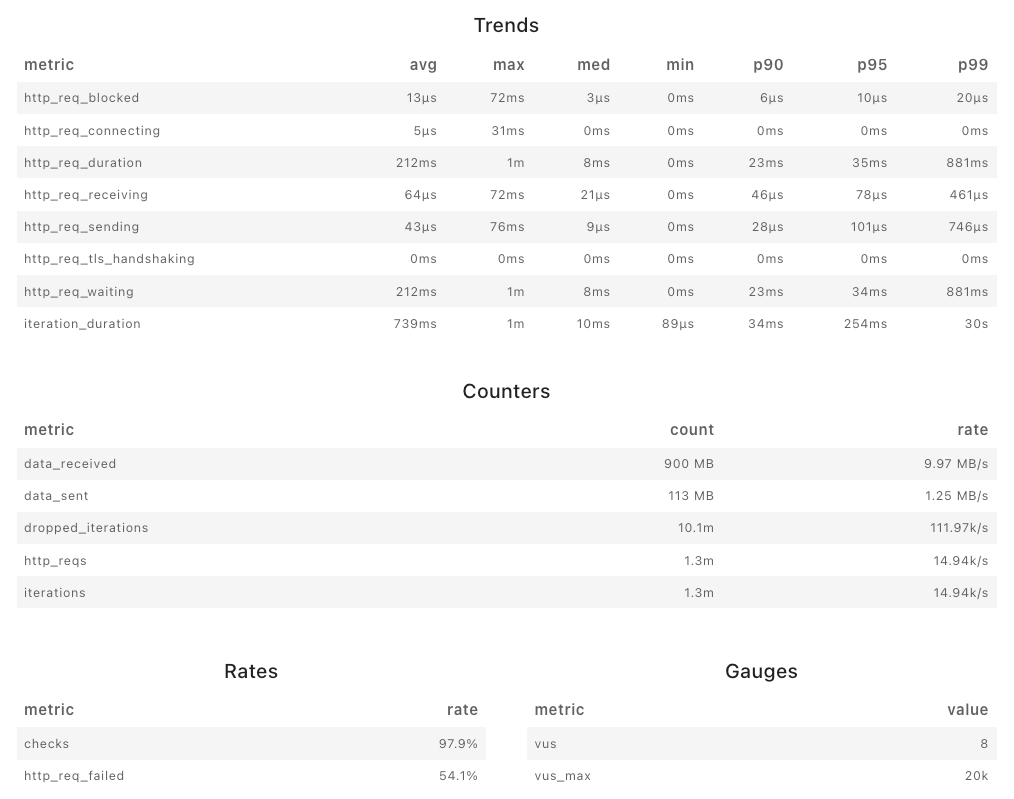
Axum
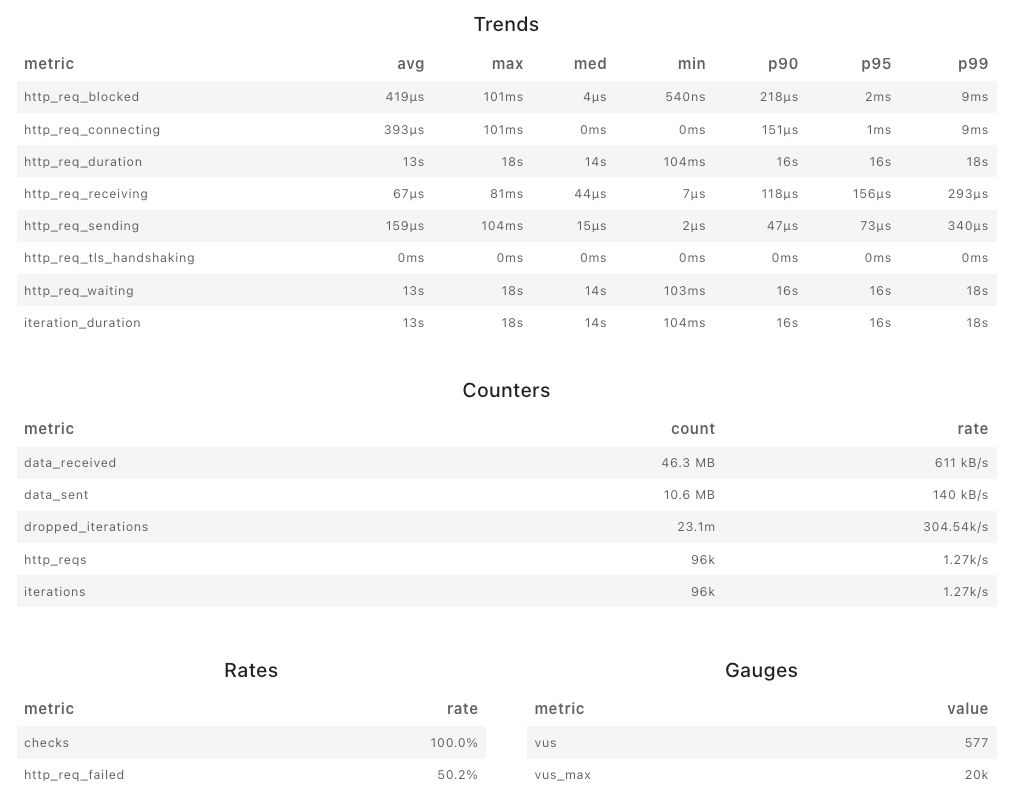
Ktor
Result
Ktor is very slow compared to Axum. I think it even held back a little out of pity. I compared results on different machines. But the result is the same - Rust and Axum significantly outperform Kotlin and Ktor. In this test, on a powerful machine (64Gb + 9950x), the performance difference between Axum and Ktor is measured in orders of magnitude: from 12! times in throughput to 1,750! times in latency. It's a knockout.
Both Rust and Kotlin can be optimized, but I didn't set myself that task - I wrote typical API in typical ways, the simplest and most convenient way. You read the article, did Rust seem very difficult to you? Or do you also see that there is no significant difference when using Axum and Ktor? Using Rust and Axum, you get a significant performance boost with the same effort, so why pay more? I admit that somewhere I could have made a mistake in Ktor (I still can't believe that there is such a gap in performance between them) - I will be glad to know about it, but for now, for writing API, I prefer the more performant language and framework.