Compose for IDEs
July 14, 2026
When you build developer tooling, sooner or later you'll need to implement extensions or plugins for IDEs to grow your ecosystem. Today, two players dominate the market — IDEA and VS Code. Other environments exist, but they're either highly specialized or outdated — keeping up with the market leaders is no easy feat.
At the same time, a whole family of derivative IDEs has grown around IDEA and VS Code — Android Studio, Cursor, Windsurf, and dozens of others. These IDEs share an open platform core that they use to build their own versions for their own needs. This means that writing a plugin for one of these two platforms will most likely cover the majority of their derivatives as well.
But to make the same plugin actually work in both VS Code and IDEA, you have to choose: either write two independent native plugins (called extensions in VS Code, but for simplicity I'll refer to them all as plugins), or use a webview.
Webview in IDEA isn't exactly a bad option, but it's definitely not the default. The platform itself explicitly recommends implementing UI using the standard Swing framework of the IntelliJ Platform, and using JCEF (Chromium-based webview) only when the plugin genuinely needs to display HTML documents or the standard approach falls short. There are specific technical reasons for this:
- IntelliJ is a Java/Swing application — there's no browser engine inside by default. JCEF literally embeds a separate, foreign Chromium runtime directly into the IDE process — the more webviews you open, the more memory and CPU they consume from the entire IDE, and any crash in Chromium can bring down the whole process, along with unsaved data.
- There's no direct DOM access from plugin code — communication with JavaScript is asynchronous only, through a callback mechanism, not direct invocation like in regular web development.
- Webview is tied to a specific bundled JetBrains Runtime — if the IDE runs on a different JDK, you'll need to account for a separate fallback in case it's absent.
So it's a compromise: two native plugins mean double the work and double the maintenance, while a single JCEF-based webview plugin saves effort at the cost of fragility and extra weight inside the IDE.
But using JavaScript and webview isn't the only way to write a cross-platform plugin. The same can be achieved with Compose Multiplatform (CMP). Using the type-safe Kotlin language and the CMP framework, you can write the same UI code for both IDEA (natively, via Swing) and VS Code — without writing and maintaining two independent plugins from scratch.
With CMP, we get rid of the heavy webview for IDEA, and build a JS plugin for VS Code. The webview remains — but the trade-off works differently: it's not as expensive. VS Code itself is built entirely on Electron, meaning its own UI — TreeView, status bar, menus — is already rendered through Chromium. A webview in VS Code is just another <iframe> inside an already running browser process, not embedding a foreign runtime into an alien environment, as is the case with IntelliJ.
Moreover, our plugin becomes virtually platform-independent — if desired, the same UI code can be turned into a native desktop application or a regular website in a browser. We'll explore this approach in this article.
CMP
Compose Multiplatform is a way to describe an interface once in Kotlin and get its native implementation on multiple platforms at once: Android, iOS, Desktop (JVM), Web (Kotlin/JS and Wasm) — and, as Cross Plugin demonstrates, inside IDEs themselves.
It's important to understand the difference between two different levels of multiplatform development, which are easy to confuse:
- Kotlin Multiplatform (KMP) — about sharing business logic code (networking, database, models), while the UI is written natively for each platform: SwiftUI on iOS, Jetpack Compose on Android, something custom on desktop.
- Compose Multiplatform (CMP) — goes a step further and makes the UI layer itself shared. The same
@Composablecode is rendered via Skia on all targets (except Android), rather than being rewritten for each platform.
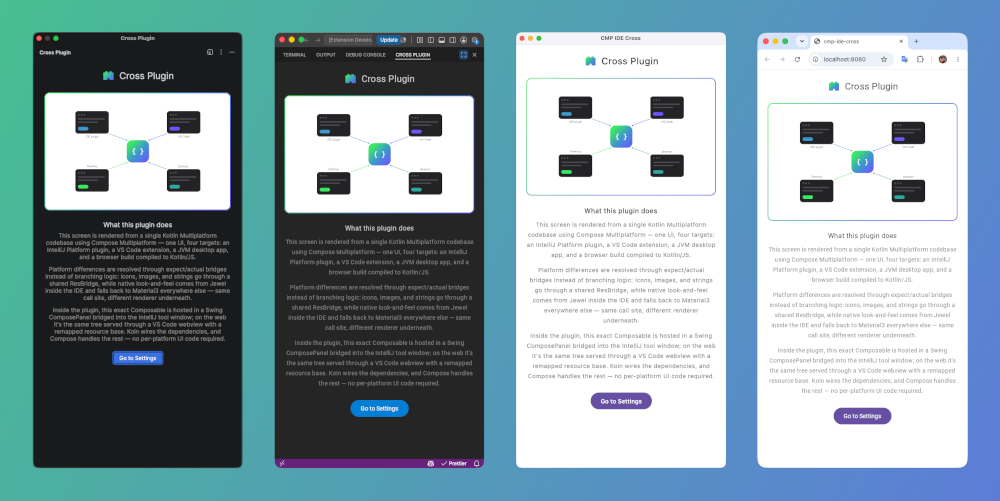
For Cross Plugin, this is the key distinction: not shared logic with different UI on top, but literally the same tree of composables running inside four fundamentally different hosts — a Swing panel in IntelliJ, a webview in VS Code, a native desktop window, and a browser.
Targets
Cross Plugin has only two Kotlin targets — jvm() and js { browser() } — but they unfold into four meaningfully different ways to show the same UI to the user:
- IDEA Plugin — the same JVM target, but hosted not in a separate window, but inside a
ComposePanelembedded in IntelliJ's own Swing tool window. The theme comes not from Material3, but from Jewel — a library that draws Compose components in the style of the IDE's native interface. - JVM (desktop) — the exact same JVM target, only launched as a regular standalone application: its own window, its own theme (Material3 this time, not Jewel), without any IDE integration.
- VS Code extension — the JS target, compiled into the same JS bundle as regular web, but loaded not directly into a browser, but into a VS Code extension's webview — with all the accompanying specifics (CSP,
<base href>, a custom bridge for native dialogs viapostMessage). - JS (web) — the same JS bundle, but opened as a plain web page, without any host on top.
Importantly, the VS Code extension and JS (web) are not two different builds, but the same artifact plugin-ui:webApp — the only difference is where it's inserted: into a webview or directly into a browser. The same principle holds for the two JVM targets: the code is the same, only the surroundings differ — the IDE's Swing tool window or the empty window of a standalone application.
Dependencies
In 99% of cases, Compose Multiplatform dependencies are just regular components and libraries, like in any other Kotlin project. But Cross Plugin has one host where this rule breaks down — IntelliJ IDEA itself.
Even without a plugin, the IDE already carries part of the Compose runtime inside — it's needed for Jewel, the library that draws Compose components in the spirit of the IDE's native interface. This isn't wired in manually, but through the ready-made composeUI() DSL from the org.jetbrains.intellij.platform Gradle plugin:
intellijPlatform {
    intellijIdea("2026.1.4")
    composeUI()
    pluginComposedModule(implementation(projects.pluginUi.shared))
    bundledPlugin("com.intellij.java")
    bundledPlugin("org.jetbrains.kotlin")
}
If the plugin then pulls in its own copy of the same libraries with a regular implementation, you end up with two independent copies of the same runtime, loaded under different classloaders: one from the IDE itself, the other from the plugin. From the JVM's perspective, these are different classes, even with the same name and version — hence ClassCastException of the "class X cannot be cast to class X" variety and LinkageError.
The solution is not to bundle what composeUI() already provides. In the commonMain of the plugin-ui:shared module, everything that composeUI() covers is declared not as implementation, but as compileOnly:
commonMain.dependencies {
    compileOnly(libs.compose.runtime)
    compileOnly(libs.compose.foundation)
    compileOnly(libs.compose.material3)
    compileOnly(libs.compose.ui)
    compileOnly(libs.compose.components.resources)
    compileOnly(libs.navigation3.ui)
    compileOnly(libs.navigationevent.compose)
    compileOnly(libs.koin.compose)
}
But compileOnly is a promise to the compiler, not to the runtime. Ultimately, someone still has to put the actual material3, koin.compose, navigation3.ui, and navigationevent.compose classes on the running IDE's classpath — just not through shared, but through plugin-idea itself:
dependencies {
    implementation(libs.compose.material3) { excludePlatformProvided() }
    implementation(libs.koin.compose) { excludePlatformProvided() }
    implementation(libs.navigation3.ui) { excludePlatformProvided() }
    implementation(libs.navigationevent.compose) { excludePlatformProvided() }
}
composeUI() provides the bare Compose runtime and part of the Navigation3 ecosystem (lifecycle, savedstate, navigationevent), but does not provide material3, koin-compose, or navigation3-ui themselves — those have to be pulled in for real. The problem is that each of these libraries transitively pulls in exactly what composeUI() already provided — meaning an honest attempt to include them risks bringing back the same class duplication problem, just through the back door. excludePlatformProvided() solves this — a custom helper that strips from transitive dependencies precisely what the platform already covers:
/**
 * Bare Compose runtime — what composeUI() actually provides.
 */
fun ExternalModuleDependency.excludeComposeRuntime() {
    exclude(group = "org.jetbrains.compose.runtime")
    exclude(group = "org.jetbrains.compose.ui")
    exclude(group = "org.jetbrains.compose.foundation")
    exclude(group = "org.jetbrains.compose.animation")
    exclude(group = "androidx.compose.runtime")
}

/**
 * Excludes everything the IDE already provides.
 */
fun ExternalModuleDependency.excludePlatformProvided() {
    excludeComposeRuntime()
    exclude(group = "androidx.lifecycle")
    exclude(group = "org.jetbrains.androidx.lifecycle")
    exclude(group = "androidx.savedstate")
    exclude(group = "org.jetbrains.androidx.savedstate")
    exclude(group = "androidx.navigationevent")
    exclude(group = "org.jetbrains.androidx.navigationevent")
}
Both functions are gathered in a single file (buildSrc/src/main/kotlin/PlatformProvided.kt) — the only place where new conflicting coordinates should be added. In practice, the same small set of coordinates repeats across transitive dependencies of all sorts of libraries, so you won't need to endlessly expand this list.
A similar story plays out with a third set of libraries — this time the conflict comes not from composeUI(), but from the IDE's Kotlin plugin (bundledPlugin("org.jetbrains.kotlin")), which carries kotlinx-coroutines-core and kotlinx-serialization-core with it:
configurations.named("runtimeClasspath") {
    exclude(group = "org.jetbrains.kotlinx", module = "kotlinx-coroutines-core")
    exclude(group = "org.jetbrains.kotlinx", module = "kotlinx-coroutines-core-jvm")
    exclude(group = "org.jetbrains.kotlinx", module = "kotlinx-serialization-core")
    exclude(group = "org.jetbrains.kotlinx", module = "kotlinx-serialization-core-jvm")
}
One detail here is important — it looks like a stylistic choice at first glance, but it's actually a necessity: the exclusion is made specifically on the runtimeClasspath configuration, not through the broader and seemingly more reliable configurations.all. The difference is that configurations.all would also catch the classpath of the Kotlin compiler itself — and the K2 daemon needs these same libraries for its own work, regardless of what the plugin runtime sees. Cutting them out everywhere at once means breaking the project's compilation just to fix the runtime.
The root of the problem with IntelliJ IDEA is essentially one thing — what the platform has already loaded: whether it's composeUI() or the bundled org.jetbrains.kotlin. The logic is consistent: there's a conflict — exclude. If you add a new library that pulls in transitive dependencies, the necessary exclusion is most likely already in the list. And if it's suddenly not and you catch a ClassCastException/LinkageError — add it and forget about it.
Other platforms don't have these problems — everything we declared as compileOnly there is simply connected via implementation for the respective platform.
Jewel / Material
Jewel is a library from JetBrains that draws Compose components in the style of the IntelliJ Platform's native interface: colors, fonts, spacing — all matching the current theme of the IDE itself. Plain Material3 inside a plugin would look alien — as if a piece of a foreign application were pasted into the IDE interface. Jewel solves this problem, but only works inside the IDE.
Hence a simple scheme: a common Components facade that either gets a native implementation from the platform, or falls back to Material3 as an honest cross-platform default:
object Components {
    @Composable
    fun Button(...) {
        PlatformComponents.Button(onClick, modifier, content)?.invoke() ?: run {
            MButton(onClick = onClick, modifier = modifier) { content() }
        }
    }
}
PlatformComponents.Button(...) returns (@Composable () -> Unit)? — not the rendering itself, but a wrapper lambda or null. null means "there's no native implementation here, draw it yourself via Material3" — the calling code doesn't need to check anything manually. For platforms without Jewel (Desktop, JS) — following the familiar pattern — it's simply actual typealias PlatformComponents = PlatformComponentsEmpty.
One nuance is important here: plugin-idea and desktopApp both compile to the same JVM target, meaning they get the same compiled class actual object PlatformComponents. The difference between them is not at the expect/actual level, but inside the function itself, at runtime:
actual fun Button(...): (@Composable () -> Unit)? {
    if (ViewEnvironment.current.platform != Platform.IntellJPlugin) return null
    return { JButton(onClick = onClick, modifier = modifier) { content() } }
}
The same compiled code on Desktop gets Platform.Desktop from the environment, the condition fails, null is returned, and Components.Button falls back to Material3 — while inside the plugin, Platform.IntellJPlugin passes the check, and a real Jewel component is drawn. Same actual, different behavior — not because the platform differs at compile time, but because the execution environment differs at runtime.
Bridge
Bridge is a container that gathers three independent parts into a single access point:
data class Bridge(
		val sys: SysBridge,
    val res: ResBridge,
    val vws: HashMap<PlatformView, ViewBridge>,
)
sys — common system platform calls.
res — resources: icons, images, strings.
vws — contracts for specific screens.
SysBridge
SysBridge — low-level things that each platform does in its own way: notifications, modal dialogs, and whatever the platform needs to provide for implementing common methods across screens.
interface SysBridge {
    val showNotification: ((title: String, message: String) -> Unit)?
    val showConfirmDialog: ((title: String, message: String, onResult: (Boolean) -> Unit) -> Unit)?
}
Both properties are not functions, but nullable lambdas. A platform either provides its own implementation, or honestly returns null, and the calling code decides for itself what to do in its absence — for example, show a Compose AlertDialog instead of crashing.
The signature of showConfirmDialog is deliberately built around a callback (onResult) rather than as a regular function with a return value — and here's why, looking at the implementations per platform.
IntelliJ — the platform's native dialog is synchronous, the answer comes back immediately:
override val showConfirmDialog: ((title, message, onResult) -> Unit) =
    { title, message, onResult ->
        onResult(
            MessageDialogBuilder.okCancel(title, message)
                .icon(Messages.getQuestionIcon())
                .ask(project)
        )
    }
.ask(project) immediately returns Boolean — onResult is called right away, within the same line.
VS Code, on the contrary, can only communicate with the extension asynchronously, via postMessage — the answer physically cannot arrive in the same call:
override val showConfirmDialog: ((title, message, onResult) -> Unit) =
    { title, message, onResult ->
        api.send(
            target = "showInformationMessage",
            args = arrayOf("$title\n\n$message", kotlin.js.json(Pair("modal", true)), "Yes", "No")
        ) { result -> onResult(result == "Yes") }
    }
onResult will be called later, when a postMessage arrives from the extension with a matching requestId.
That's why the common interface is written with a callback, not a direct return value: since at least one platform fundamentally cannot respond synchronously, the entire contract must be asynchronous — even where a specific implementation (IntelliJ) could have done without it.
The remaining two platforms show the edge cases of the same contract. Web implements notifications via window.alert, and for the confirmation dialog honestly returns null — a bare browser simply has no platform modal window, so the calling code draws a Compose AlertDialog itself. Desktop currently implements nothing at all — both properties are null. Compose covers the dialog, just like for Web — platform implementations can always be added later if desired. SysBridgeEmpty exists precisely for this case — a platform can get a native implementation later, without a single change to the rest of the code.
All of this is assembled in four places — one Environment per platform, each with its own set of res/sys/vws:
data class PluginEnvironment(
    val project: Project,
    override val platform: Platform = Platform.IntellJPlugin,
    override val bridge: Bridge = Bridge(
        res = PluginResBridge(),
        sys = PluginSysBridge(project),
        vws = hashMapOf(
            PlatformView.Main to PluginMainViewBridge(),
            PlatformView.Settings to PluginSettingsViewBridge(),
        )
    )
) : Environment
VsCodeEnvironment, WebEnvironment, and DesktopEnvironment are structured identically, just with different sys/res implementations inside. No screen (MainView, SettingsView) knows which platform it's facing — it gets a ready-made Environment via ViewEnvironment.current and calls env.bridge.sys.showConfirmDialog, without worrying whether it executes synchronously, asynchronously, or not at all.
hashMapOf allows flexible screen configuration: in this case, all platforms use the same set, but as the application evolves, the set may differ — flexibility doesn't hurt here.
ResBridge
ResBridge — access to icons, images, and localized strings, uniform in form across all platforms:
interface ResBridge {
    @Composable
    fun icon(icon: PlatformIcon, size: Int = 40): Painter

    @Composable
    fun image(image: PlatformImage, width: Int = 0, height: Int = 0): Painter

    @Composable
    fun string(key: PlatformString, vararg params: Any?): String
}
The keys are not strings, but sealed enums (PlatformIcon, PlatformImage, PlatformString): a typo in a resource name will be caught by the compiler immediately, not at runtime on a specific platform.
The implementations, however, diverge more than with SysBridge — not in the behavior of the same mechanism, but in the loading mechanism itself. desktopApp, webApp, and VS Code all use the same ComposeResBridge, built on top of compose.components.resources:
class ComposeResBridge : ResBridge {
    @Composable
    override fun icon(icon: PlatformIcon, size: Int): Painter {
        return when (icon) {
            PlatformIcon.Sidebar -> painterResource(Res.drawable.sidebar)
        }
    }
    // image/string — similarly, via painterResource/stringResource
}
While plugin-idea uses its own, via IconLoader and Swing:
class PluginResBridge : ResBridge {
    @Composable
    override fun icon(icon: PlatformIcon, size: Int): Painter {
        return when (icon) {
            PlatformIcon.Sidebar -> IconBundle.Sidebar.toPainter(size, size)
        }
    }
    // string — via MessageBundle.message(key, *params)
}
toPainter() is a bridge function that renders a Swing Icon to a raster of the required size and wraps the result in a Compose BitmapPainter.
In an IntelliJ plugin, the icon in plugin.xml (icon="...") is resolved by the platform via reflection to a regular javax.swing.Icon, before any Compose composition. String localization works differently — and is also tied to reflection and plugin.xml. Even if we set these facts aside and forcefully shove resources into the plugin, whose status is currently ambiguous, we'd end up not with clean resources like on all other platforms, but with broken standard approaches to using resources in plugins.
Hence two different resource loading mechanisms, and therefore two different places on disk where files are expected: IconLoader inside plugin-idea looks for them in src/main/resources/, while Compose Resources looks in composeResources/drawable/ of the plugin-ui:resources module. Instead of two copies of the same bytes — a single symlink:
plugin-idea/src/main/resources/drawable -> ../../../../plugin-ui/resources/src/commonMain/composeResources/drawable
Both mechanisms read the same file on disk, each through its own API. During the plugin build, Gradle dereferences the symlink into a regular file — the final .zip contains neither the symlink nor any dependency on what that path looked like on the developer's disk.
ViewBridge
The final block of Bridge — vws: HashMap<PlatformView, ViewBridge>. Why have a separate ViewBridge for each screen at all, rather than dumping everything into the common SysBridge? res/sys is what all screens need equally (icons, dialogs). But a screen may also need something of its own, highly specialized — and not necessarily available on all platforms at once.
Imagine a project creation wizard screen — it lives inside the IDE plugin (where there's a New Project Wizard API to talk to directly), but makes no sense in a standalone desktop application — there's simply no concept of an "IDE project wizard" there. res/sys won't work for such a screen — it's not an icon or a system dialog, it's a specific communication protocol with a particular platform API. That's where a dedicated ViewBridge comes in: the screen describes its narrow contract, and only those platforms where this screen actually exists implement it.
MainViewBridge/SettingsViewBridge in Cross Plugin are currently empty — because these two specific screens have nothing to add beyond res/sys for now. The form vws: HashMap<PlatformView, ViewBridge> itself requires a common type for all map values — MainViewBridge and SettingsViewBridge are different interfaces, and ViewBridge is the common base that keeps the map type-safe, even when its concrete implementations are currently empty.
The assembled Bridge enters composition through a single entry point — InitApp, called by each platform's entry point (main() on desktop and web, PluginSidebar in the IDE):
@Composable
fun InitApp(
    environment: Environment,
    composable: @Composable ViewScope.() -> Unit
) {
    val lifecycleOwner = remember {
        object : LifecycleOwner {
            override val lifecycle = LifecycleRegistry(this).apply {
                currentState = Lifecycle.State.RESUMED
            }
        }
    }
    CompositionLocalProvider(
        LocalLifecycleOwner provides lifecycleOwner,
        ViewEnvironment provides environment
    ) {
        KoinApplication(KoinConfiguration {
            logger(KermitKoinLogger(Logger.withTag("Koin")))
            modules(appModule, module {
                single { environment }
            })
        }) {
            ViewScope().composable()
        }
    }
}
Three things are registered here at once:
lifecycleOwner — a dummy LifecycleOwner, permanently fixed in the RESUMED state. Neither the IDE tool window, nor VS Code's webview, nor a browser tab has a real lifecycle in the spirit of an Android activity with pauses and stops — instead of implementing this semantics for each platform separately, InitApp simply gives libraries that need a lifecycle owner by contract (Navigation 3, lifecycle-runtime-compose) a stub that always answers "I'm active."
ViewEnvironment provides environment — the platform Environment (with the Bridge already assembled inside) is placed into CompositionLocal, so that any composable further down the tree can read it via ViewEnvironment.current.
KoinApplication — the same environment is also registered in Koin as a separate single. This creates two parallel paths to the same object: composable functions take Environment from CompositionLocal directly, while classes that Koin creates itself (like MainViewModel) get it via get() in the constructor — env = get() resolves the exact same instance, just from the DI graph rather than from composition.
Each platform wraps RootAppDispatcher() in its own way — primarily regarding theming. The theme is set differently for different platforms, and obtaining the Bridge (inside InitApp) happens before theme initialization. For example, in the JS target, the same main() serves both VS Code and a regular browser:
@OptIn(ExperimentalComposeUiApi::class)
fun main() {
    ComposeViewport {
        val isVsCode = isVsCodeWebView()
        val vsCodeApi: dynamic = if (isVsCode) js("acquireVsCodeApi()") else null
        InitApp(if (isVsCode) VsCodeEnvironment(vsCodeApi) else WebEnvironment()) {
            if (isVsCode) {
                VSExtensionTheme {
                    RootAppDispatcher()
                }
            } else {
                MaterialTheme {
                    RootAppDispatcher()
                }
            }
        }
    }
}
The theme choice (VSExtensionTheme vs plain MaterialTheme) lives inside the receiver lambda, which InitApp calls only after the Environment has been assembled and distributed — via CompositionLocalProvider and Koin. The order here is no accident: by the time the platform decides what to wrap RootAppDispatcher() in, ViewEnvironment.current is already available and could be used inside the theme itself if needed. In the case of VSExtensionTheme, this doesn't happen — it reads colors directly from VS Code CSS variables via window.getComputedStyle, not through Environment — but the very ability to access the environment from within the theme exists precisely because of this initialization order.
ViewScope deserves a separate mention:
class ViewScope internal constructor()

val ViewEnvironment = staticCompositionLocalOf<Environment> {
    error("Environment was not provided — wrap your content with InitPage first.")
}
ViewScope's constructor is internal — you can't create an instance from outside the module. composable: @Composable ViewScope.() -> Unit in InitApp is a lambda with ViewScope as its receiver, meaning functions like RootAppDispatcher (declared as @Composable fun ViewScope.RootAppDispatcher()) can only be called where such a receiver already exists — that is, only inside InitApp. This isn't a runtime check, but a compiler-level guarantee: RootAppDispatcher physically cannot be accidentally called bypassing InitApp, thereby forgetting to initialize Environment/Koin. And ViewEnvironment itself, if somehow reached without the InitApp wrapper, will fail with an explicit error on first access, rather than a silent null.
Each screen gets its own ViewModel through Koin, and it's worth explaining here why both registrations are single, not factory:
val appModule = module {
    includes(loggingModule)

    single {
        MainViewModel(env = get(), view = PlatformView.Main, logger = get())
    }
    single {
        SettingsViewModel(env = get(), view = PlatformView.Settings, logger = get())
    }
}
single means: one instance for the entire lifetime of the application, not a new one on each screen visit — the thing is, factory doesn't provide the right behavior here. factory creates a new instance on every access and doesn't preserve screen state between visits — and in plugins, there's simply no concept of a screen lifecycle with explicit state release (in the spirit of Android ViewModel bound to its NavBackStackEntry). The same is true for desktop applications and browsers — none of the platforms Cross Plugin targets have this logic. single here isn't a compromise for simplicity, but the only option that preserves screen state for the entire runtime of the application — navigating from Main to Settings, MainViewModel isn't destroyed, it simply ceases to be visible. BaseViewModel has a dispose() method that cancels viewModelScope — a mechanism in case it's ever needed.
Navigation — Navigation 3, with type-safe routes:
@Serializable
sealed interface AppRoute : NavKey {
    @Serializable
    data object Main : AppRoute
    @Serializable
    data object Settings : AppRoute
}
And a minimal dispatcher on top of NavBackStack:
@Composable
fun ViewScope.RootAppDispatcher() {
    val backStack = remember { NavBackStack<AppRoute>(AppRoute.Main) }

    NavDisplay(backStack = backStack) { route ->
        NavEntry(route) {
            when (route) {
                AppRoute.Main -> MainView(onNavigateToSettings = { backStack.add(AppRoute.Settings) })
                AppRoute.Settings -> SettingsView(onBack = { backStack.removeLastOrNull() })
            }
        }
    }
}
AppRoute is annotated with @Serializable — Navigation 3 can restore the back stack after process death precisely through route serialization. But Cross Plugin deliberately doesn't use this — backStack is kept in a plain remember, without serialization-based restore. The reason is exactly the same as we saw in the dependencies chapter: androidx.savedstate, on which this restoration mechanism is built, conflicts with the IDE's own Compose runtime — the same class, loaded by two different PluginClassLoader. A simple in-memory back stack doesn't use this mechanism at all, so there's no source of conflict.
Summary
The same UI code in Cross Plugin runs inside four fundamentally different hosts — IntelliJ's Swing tool window, VS Code's webview, a native desktop window, and a browser tab — and everywhere it's literally the same tree of composables, not four parallel implementations with shared business logic on top.
In IntelliJ, rendering is fully native: Compose draws via Skia (Skiko) directly on the JVM, with no DOM/CSS/HTML layer between code and pixels — it's the same rendering mechanism as a regular Swing application, just through a different API. In VS Code, it's the same Skia engine, just compiled to WebAssembly and drawing on a canvas inside the webview — bypassing the DOM rendering that HTML-based extensions typically work through.
Implementing plugins with Compose Multiplatform provides flexibility under any circumstances and removes the question of dividing responsibilities between developers: for a Kotlin developer, an IDE plugin is a native environment, not something that needs to be learned from scratch. One language, one project, a unified codebase instead of parallel maintenance of multiple implementations for each platform.